Demo: https://www.madamefancypants.com/collections/designers
If your store has lots of products for a specific collection page on your Shopify store? Instead of getting customers to navigate to multiple pages of products you can now add infinite scroll to your Shopify collections pages so customers can keep scrolling through.
</head> and paste the below code just above it.{% for product in collection.products %} and add more a DIV tag to wrapper and add more a DIV tag just below it. For example
|
1
2
3
4
5
6
7
8
9
10
|
<div id="Huratips-Loop" >
{% for product in collection.products %}
{% include 'product-grid-item' %}
{% endfor %}
</div>
<div id="Huratips-Pagination">
{% if paginate.next %}
<a href="{{ paginate.next.url }}">Loading More</a>
{% endif %}
</div>
|
|
1
2
3
4
5
6
7
8
|
<script>
document.addEventListener("DOMContentLoaded", function() {
var endlessScroll = new Ajaxinate({
container: '#Huratips-Loop',
pagination: '#Huratips-Pagination'
});
});
</script>
|
Demo url: https://debute-section-theme.myshopify.com/collections/all
This tutorial is for Shopify's Dawn theme only.
We're going to use a script called Scrollify which 'Ajaxinates' Shopify.
First download the script here. or here Add ajaxinate.min.js to the assets folder of your shopify theme
Then add this script tag in main-collection-product-grid.liquid near the other asset_url tags:
{% 'ajaxinate.min.js' | asset_url | script_tag %}
Add this script right before the schema starts in main-collection-product-grid.liquid to create a new ajaxinate instance.
<script>
const endlessCollection = new Ajaxinate({
container: '#product-grid',
pagination: '.infinite_next',
});
</script>
Then in snippets find pagination.liquid and edit line 44
Add
class="infinite_next"To the <li> under “paginate.next”. It should look like this screenshot:
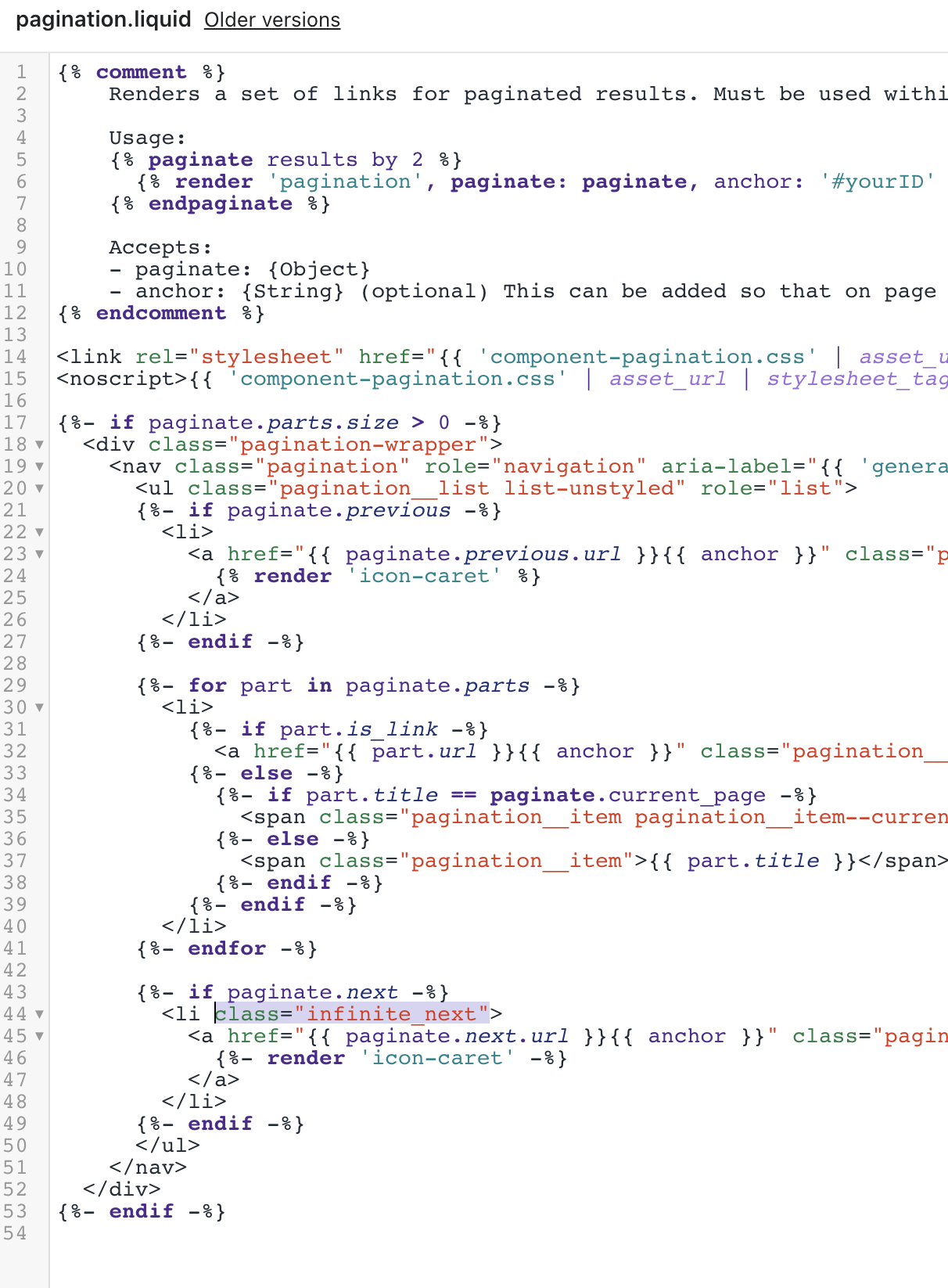
We now need to add another initialization in facets.js to account for when a user is filtering products and the pagination changes. In facets.js add this script to the static renderProductCount() function on line 85.
We don't need script tags this time because we're placing it in a javascript function.
const endlessCollection = new Ajaxinate({
container: '#product-grid',
pagination: '.infinite_next',
});


Hello! Do you know why this no longer works in Craft 15.2?